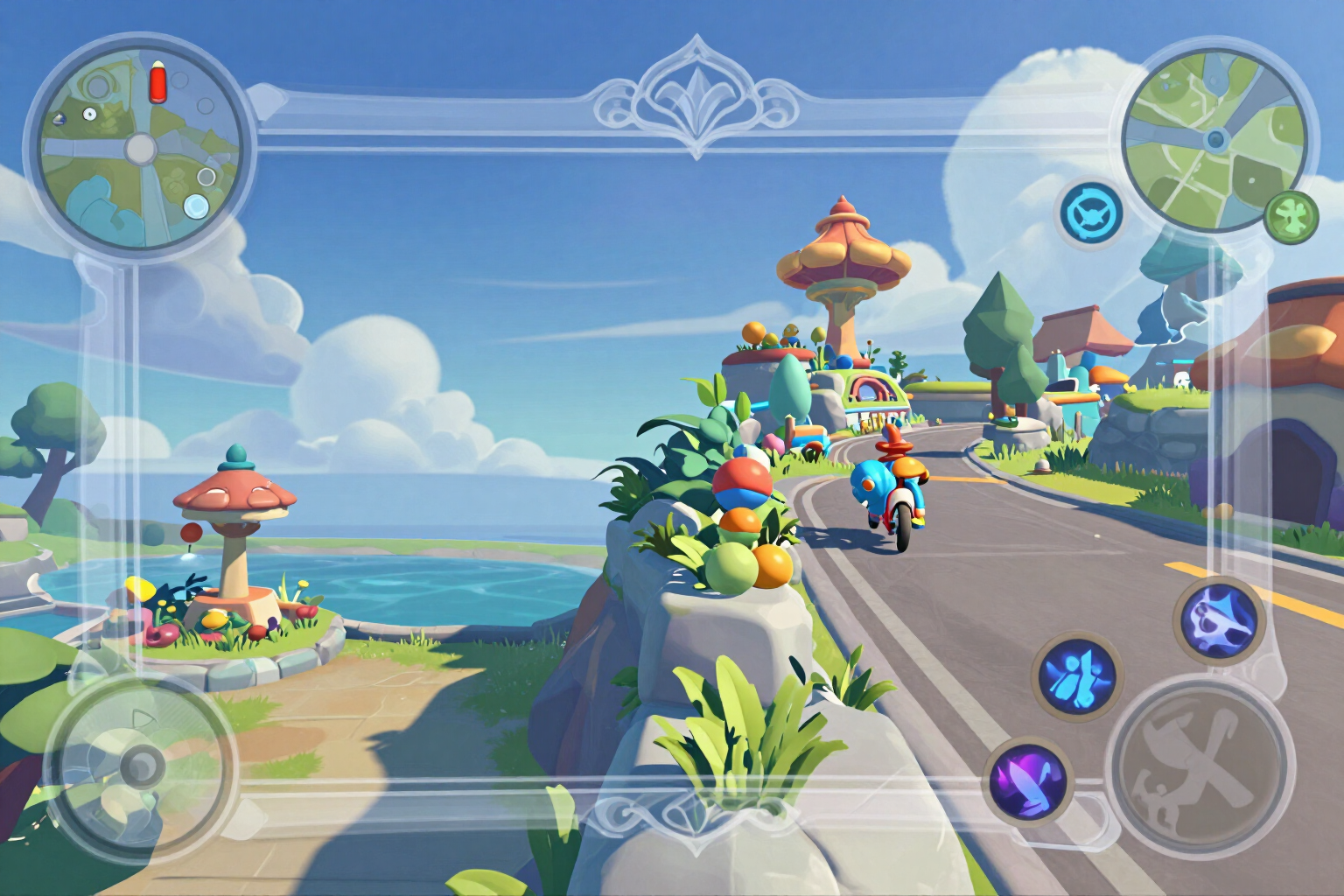
Mobile Live Overlay for MLBB: a PNG frame with a transparent center
Vertical for TikTok Live and horizontal for YouTube, with the frame interrupted where the minimap, skills, and scoreboard are, so it doesn't cover the gameplay.
The problem with overlays you download from elsewhere isn't the design: it's that the PNG is opaque or the frame is right over the minimap. Here, transparency is checked in the file before delivering anything to you.
You choose the format of your live stream — vertical 1080×1920 for TikTok Live, Prism or Shorts, or horizontal 1280×720 for YouTube — enter your squad's name and tag, and the app composes a PNG the exact size of your stream, with a top bar displaying your name and a perimeter frame in the color of your choice. The entire center of the image remains empty: it's real transparency, not a light gray that looks like it. That's why the preview shows it in squares, so you can see exactly which part will let your gameplay through.
The frame isn't a closed rectangle. Each format has three areas declared that the game uses at the edges — the minimap, the skill row, and the top scoreboard — and the frame is drawn in segments: where one of those areas touches an edge, the stroke is cut. The areas are shown with a dashed line in the preview, so you check before downloading that no part of the frame will cover a button you need to press.
The name and tag are not written by any AI: they are stamped on the server with real condensed typography, with a black outline so they are readable over any background, and the text adjusts automatically to the available width. If you've already created your squad emblem in the app, you can reuse it as a brand alongside the name without it costing you a new generation: the composition is 100% image processing, without AI and without consuming generation quota.
And before saving the file, the app measures the binary. If it doesn't confirm that the PNG has a real alpha channel, the piece isn't delivered and it tells you: an opaque frame would cover the entire gameplay, and we prefer to give you nothing rather than that. When it works, you download the PNG and load it as an image layer over the game in your live streaming app.
Try Live stream overlay right here
Use it free without an account. If you want to save your result, you can sign up afterwards.
Save / Sign upBenefits of Live stream overlay
Verified transparency in the file, not promised
the app analyzes the generated PNG and, if it doesn't confirm the alpha channel, it doesn't deliver the piece. No opaque overlay reaches your download.
The frame is interrupted where the game places its controls
three areas reserved by format (minimap, skills, and scoreboard) cut the stroke of the frame, so it doesn't cover anything you need to see or press.
The two formats that are truly used from mobile
vertical 1080×1920 for TikTok Live, Prism, and Shorts, and horizontal 1280×720 for YouTube. No more manually resizing a file designed for PC.
Frame preview
see the drawn transparency and the reserved areas marked with a dashed line before downloading, not after setting up the live stream.
Your name in real typography, not AI-generated
the name and tag are stamped on the server with condensed font and black outline, automatically adjusting to width and appearing readable instead of distorted.
Four palettes and the emblem you already have
neon cyan, gold and crimson, dark violet or toxic green; and if you've already generated your squad's emblem, it is reused as the overlay brand at no extra cost.
No AI and no generation cost
the overlay is composed with pure image treatment, so you can redo it by changing format, palette, name, or tag as many times as you want.
We don't ask for your player ID or game account
the tool only generates an image file that you download. It doesn't stream for you, it doesn't touch your account, and it doesn't modify the game.
Set up your live stream frame before hitting the broadcast button
The tool opens right here. You just need a free account to save and download the PNG.
In the features that use AI, responses are generated by artificial intelligence and are not a substitute for professional advice.